Agentic Workflows in GitHub - Part 1: What They Are and How They Transform Traditional CI/CD
.png)
Imagine arriving at work in the morning and, instead of a backlog of pending tickets, finding Pull Requests ready for review. PRs that built themselves while you were asleep, without you writing a single line of code.
Who made them? That is exactly what Agentic Workflows are here to offer: an AI agent working for you right inside GitHub, where you still maintain full control over what goes into production and what doesn't.
What Are Agentic Workflows?
In a nutshell: AI-driven automation described in natural language. No complex YAML files, no endless scripts—just clear instructions written in Markdown.
Unlike traditional automation, the agents living inside these workflows have three key capabilities that set them apart:
- They understand context before acting: They can analyze the entire repository, the issue, and the PR to fully grasp the requirements before executing any action.
- They interpret situations instead of following rigid rules: They don't rely on strict conditional statements. The agent knows how to interpret unexpected bottlenecks along the way, whether it's a bug, a failed test, or a broken dependency.
- They live inside GitHub Actions: Everything happens within your current CI/CD environment, but with an added layer of AI (compatible with Copilot, Claude, and Codex) that opens the door to entirely new use cases.
Differences: Traditional Workflow vs. Agentic Workflow
Is this the same as using Copilot CLI? Not exactly. To understand this evolutionary leap, let’s look at a direct comparison:
.png)
The most important difference is accessibility: to create an Agentic Workflow, you don't need deep knowledge of APIs or job structures. The agent makes autonomous decisions and integrates with other tools simply by connecting through MCP (Model Context Protocol) servers.
How Does an Agentic Workflow Run in GitHub?
Before running your first agent, make sure you meet these four basic prerequisites:
- GitHub CLI (v2.0+): The essential entry point. Make sure you have the latest version installed.
- Repository with GitHub Actions: With CI/CD enabled and minimum permissions configured.
- AI Account: Copilot, Claude, or Codex configured as the engine powering the workflow.
- Write Permissions: Necessary so the agent can propose changes.
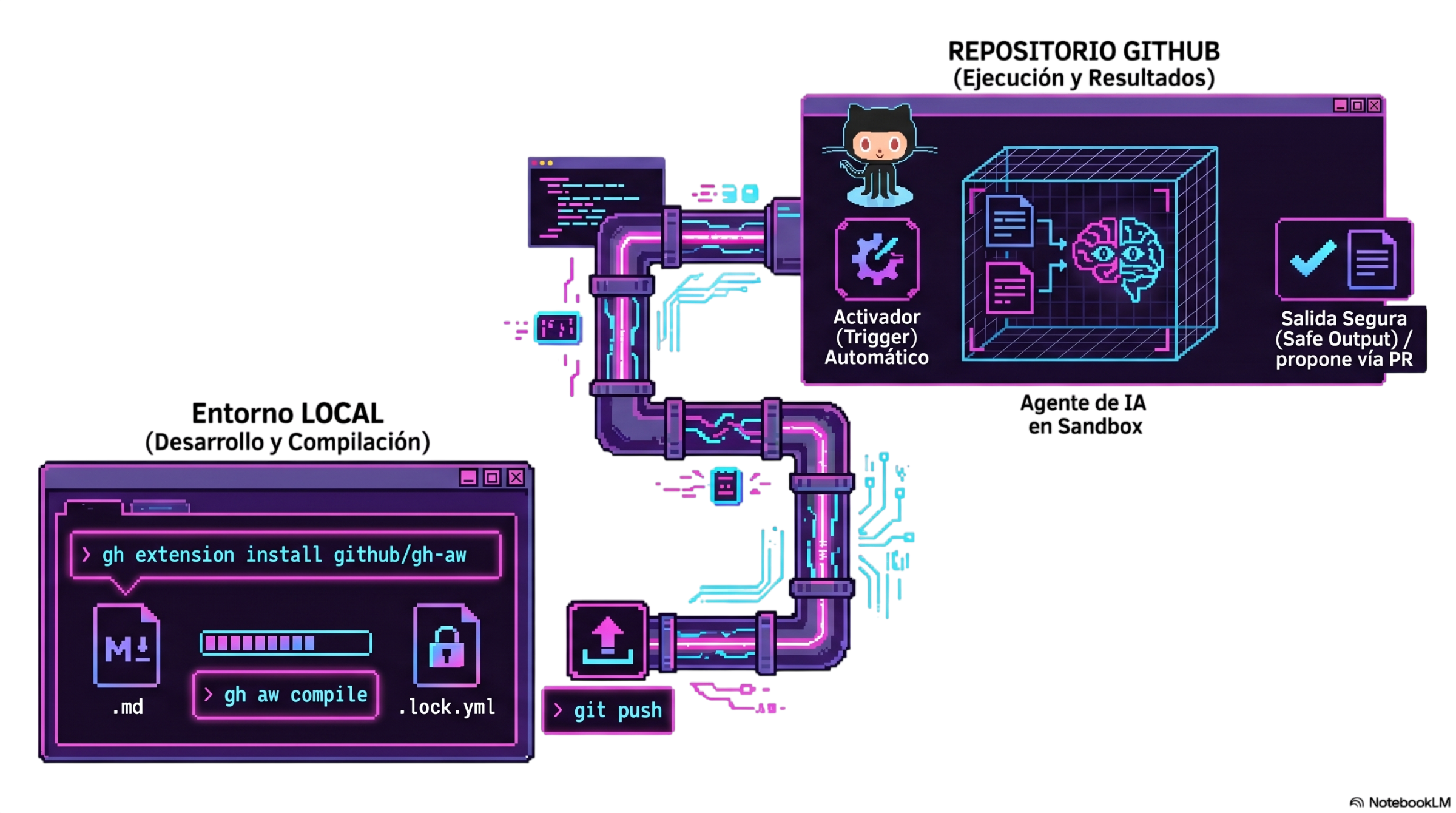
With the prerequisites ready, the magic happens by installing the gh-aw extension, which compiles your workflow from Markdown (.md) into a YAML file that GitHub Actions can execute:
# 1. Install the gh-aw extension
gh extension install github/gh-aw

# 2. Create your first natural language workflow (.md)
gh aw new my-first-agent

# (Or add one from the official catalog)
gh aw add githubnext/agentics/ci-doctor

# 3. Compile the .md → .lock.yml (the YAML that actually runs in Actions)
gh aw compile

# 4. (Optional) Run it manually to test it out
gh aw run my-first-agent

# 5. Push the changes — it runs automatically from here on out
git add .github/workflows && git commit -m "add: my first agent"
git push
Once in the repository, the workflow is triggered by the event you defined (for instance, opening an issue). The action executes the agent inside a secure environment (sandbox) and delivers a validated output.
Security in Agentic Workflows: The 5 Layers of Protection
Letting an AI interact with your codebase can feel a bit daunting. That’s why GitHub implements 5 strict layers of security:
- Read-only tokens: The agent can read and understand your repository, but it is not allowed to write code directly on its own.
- Safe-outputs: This is the catalog of allowed actions (comments, labels, PR creation). The agent makes a proposal, but the content is sanitized before being applied. Two specific modes stand out here:
- Staged mode: Simulates the entire workflow execution—ideal for testing without altering anything live.
- Ephemeral outputs: Instead of acting directly, the agent leaves an assembled proposal (an Issue or a PR) for your approval.
- Network firewall: The container running the AI is completely isolated; network traffic can only reach explicitly authorized domains.
- Threat detection: Continuous monitoring to prevent secret leaks, malicious patterns, or corporate policy violations.
- Human-in-the-loop: The golden rule. The agent handles the heavy lifting and proposes solutions, but you have the final say on what gets merged.
Should I Replace My Traditional CI/CD?
The short answer is NO. We are not talking about replacing, but rather complementing.
Traditional actions remain the best choice for deterministic pipelines that require speed, predictability, and structured steps at scale (such as running tests, building, deploying, or linting).
Agentic workflows, on the other hand, sit on top of the pipeline to tackle problems that demand context and adaptability. GitHub classifies these into clear design patterns: IssueOps (automated triage), OrchestrationOps (multi-step workflows), MonitorOps (intelligent repo monitoring), and ChatOps (interactive commands via comments). The agent optimizes pipeline management; it doesn't substitute it.
The potential of moving from static code to contextual automation with AI is already a reality redefining development team productivity. But what does this look like in practice? In the second part of this article, we will step away from theory and get our hands dirty: I will show you a step-by-step mini tutorial to build and deploy your very first real Agentic Workflow. Don't miss it!


.png)
